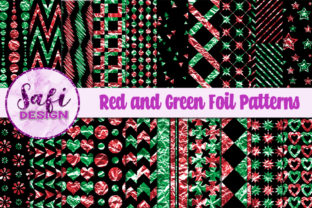
Red and Green Foil Patterns: Seamless Digital Assets for Purpose-Driven Design
Red and green foil patterns are more than festive decoration—they’re functional, high-resolution design assets built for precision and versatility in digital creation workflows. This set of 20 digital papers delivers consistent color depth, metallic texture, and intentional foil contrast—optimized for real-world use across planning, publishing, product development, and event execution. Each background measures 12 inches by 12 inches (30 cm × 30 cm) and renders at 300 dpi, ensuring clarity whether printed on premium cardstock or scaled for digital displays.
Where These Patterns Fit in Your Creative or Business Workflow
These files enter your process at multiple inflection points—not just as “pretty backgrounds,” but as structural elements that support consistency, brand alignment, and production speed. For example, a small business owner preparing holiday product launch materials may use a seamless red foil pattern to build cohesive email headers, social media banners, and printable promo cards—all from the same visual source. A freelance educator designing a New Year’s goal-setting planner inserts non-seamless green foil textures into section dividers to add tactile contrast without repeating motifs unnaturally. The distinction between seamless and non-seamless patterns isn’t arbitrary—it reflects deliberate design intent aligned with specific output needs.
Integration Across Tools and Platforms
Because these are standard JPG files, Red and Green Foil Patterns integrate without friction into widely used tools: Adobe Photoshop and Illustrator for layered composites; Canva for rapid template customization; Affinity Designer for vector-based scaling; and even Microsoft PowerPoint or Google Slides for presentation decks tied to celebrations like graduations or anniversaries. No plugins, converters, or proprietary software are required. When paired with SVG sticker kits or PNG planner elements, the foil papers serve as grounded, rich-textured backdrops—adding dimension without competing with foreground content.
For print-on-demand (POD) creators, compatibility extends beyond screen use. The 300 dpi resolution meets industry standards for commercial printing, including greeting cards, gift tags, and party invitations. If you’re batching orders through platforms like Printful or Gelato, naming files clearly (e.g., red_foil_marble_07.jpg) and organizing them in labeled subfolders—seamless, textural, gradient—reduces selection time and minimizes version confusion during upload.
Practical Use Cases by Role and Context
- Digital scrapbookers layer foil papers under photo clusters to evoke luxury and occasion—especially effective when matching red/green tones to actual event decor (e.g., Christmas table linens or graduation stoles).
- Productivity-focused planners apply subtle green foil patterns to weekly review pages or habit trackers, using the visual cue to signal growth, renewal, or intentionality—without overwhelming cognitive load.
- Small business marketers embed foil textures into limited-time offer graphics, where metallic sheen subtly signals exclusivity or seasonal urgency—ideal for Black Friday, Valentine’s Day, or year-end client appreciation campaigns.
- Educators and workshop facilitators use the papers as base layers for printable reflection worksheets or celebration certificates, reinforcing thematic resonance (e.g., red for energy and action, green for balance and achievement).
- Decoupage artists and craft entrepreneurs print foil patterns onto adhesive-backed paper or transfer sheets, then apply them to wood, ceramic, or glass surfaces—leveraging the high-resolution detail to retain sharpness after cutting and sealing.
Preparation and Organization Best Practices
Before launching into a project, spend five minutes auditing your existing asset library. Ask: Which of these 20 patterns align with my current color system? Which support tiling needs (e.g., for full-page backgrounds), and which work better as accent zones (e.g., corner flourishes or border strips)? Save thumbnails with descriptive filenames—not just “pattern_12.jpg,” but “green_foil_crushed_metal_seamless.jpg.” This small step pays off during tight deadlines or team handoffs.
If you regularly produce themed collections—like a series of birthday planner kits or quarterly celebration bundles—create a master style guide that references specific foil patterns by name and notes their intended function (e.g., “Use red_foil_brushed_gold_03 for all cover pages; avoid scaling beyond 120% to preserve foil grain”). Consistency isn’t about repetition—it’s about predictable, repeatable application.
Quality Control and Long-Term Usability
At 300 dpi and 12×12 inches, each file balances resolution and manageability. They’re large enough to withstand cropping and resizing without pixelation, yet compact enough (<5–8 MB average) to store efficiently across cloud drives or local SSDs. Unlike low-res web graphics or compressed PNGs, these files retain fidelity through multiple export cycles—critical if you’re iterating designs across Figma mockups, InDesign layouts, and final PDF proofs.
Test one pattern across three outputs before committing to a full set: render it as a digital sticker sheet (at 100% scale), print it on matte cardstock, and preview it on a mobile device. Note how lighting affects perceived foil intensity—what reads as bold on screen may soften in ambient light. Adjust brightness or overlay a faint noise layer in post-processing only if needed; the originals are calibrated for balanced contrast out of the box.
Workflow Examples You Can Adapt Today
Scenario: Launching a Holiday Client Gift Set
You’ve designed custom thank-you cards and mini planners for December delivery. Start by selecting two complementary patterns—one red-dominant seamless option for card bases, one green-dominant textured option for planner covers. Import both into your layout tool, lock layers, and build typography and iconography on top. Export final files using “Preserve Editing Capabilities” turned off—this reduces PDF size while maintaining print-ready quality. Store the original JPGs separately for future re-use with new copy or layouts.
Scenario: Building a Graduation Resource Bundle
Your bundle includes a cap-and-gown checklist, speech outline, and family photo timeline. Assign each section a distinct foil pattern—deep red for preparation phases, emerald green for celebration moments—to create intuitive visual rhythm. Because the patterns aren’t overly busy, they won’t distract from checkmarks or dates. When updating the bundle next year, swap only text and photos; the foil foundation stays consistent, reinforcing brand recognition across annual releases.
Making Intentional Choices, Not Just Decorative Ones
Red and green foil patterns succeed not because they’re seasonal, but because they carry weight—literally and perceptually. The foil effect implies craftsmanship, care, and attention to finish. When you choose one for a birthday invitation or a corporate milestone announcement, you’re signaling value before a single word is read. That intention transfers to your audience: clients feel seen, students feel celebrated, customers feel prioritized.
What matters most isn’t how many patterns you use—but how deliberately you match each to its purpose. A non-seamless crushed foil might anchor a single-page printable perfectly, while a seamless brushed variant ensures professionalism across a 24-page digital planner. Let function guide selection, not just aesthetics. And remember: high-quality digital papers aren’t consumables. They’re infrastructure—quiet, reliable, and ready when your next deadline, launch, or celebration arrives.