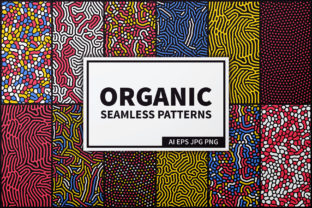
24 Organic Seamless Patterns Set
The 24 Organic Seamless Patterns Set is a curated, production-ready collection of diffusion-reaction-style backgrounds designed for real-world creative and commercial use. It includes 24 high-resolution seamless patterns—12 optimized for light contexts (white background) and 12 for dark (black background). Each pattern is delivered in four formats: AI (Illustrator CS6–CC, EPS 10), JPG (8333 × 8333 px), PNG with full transparency (same dimensions), and vector-based scalability. This isn’t decorative filler—it’s a functional asset built to integrate cleanly into design pipelines, product development workflows, and brand execution systems.
Where This Set Fits Into Your Creative or Business Process
Unlike generic pattern libraries, the 24 Organic Seamless Patterns Set enters your workflow at multiple decision points—not just as an end-stage decoration, but as a structural element. For textile designers, it serves as a foundational repeat unit before fabric sampling. For packaging teams, it becomes part of the pre-press checklist—tested early against substrate mockups to confirm contrast, scale legibility, and print fidelity. For digital product creators, the transparent PNGs slot directly into Figma or Adobe XD component libraries, enabling rapid iteration on UI surface treatments without re-exporting assets each time.
It also supports upstream planning. When developing a seasonal brand refresh, these patterns can be used in mood boards and client presentations—not as static images, but as live, scalable layers that demonstrate how organic texture behaves across touchpoints: woven labels, gift wrap, web banners, and even AR try-on interfaces. That dual-background structure (white + black variants) eliminates guesswork during handoff between designers, developers, and printers—no more last-minute background swaps or opacity adjustments.
Practical Integration Across Tools and Teams
Compatibility is built in—not bolted on. The AI and EPS files work natively in Illustrator, Affinity Designer, and CorelDRAW. The JPG and PNG versions are sized precisely for large-format output (think wall graphics, trade show backdrops, or custom wallpaper), while remaining crisp when scaled down for social media thumbnails or email headers. Because all files share the same 8333 × 8333 px dimension, batch processing in Photoshop or Lightroom is predictable and repeatable—no manual resizing per file.
For collaborative environments, organize the ZIP contents using a consistent naming convention: organic-diffusion-01-white.ai, organic-diffusion-01-black.png, etc. This makes version control smoother in shared drives or cloud platforms like Dropbox Paper or Notion databases. If you’re managing a team of freelancers, include a one-line usage note in your brief: “Use white-background variants for light UI modes or light-colored fabrics; black-background variants for dark mode interfaces or deep-toned substrates.” That small cue prevents redundant revisions.
Workflow Examples You Can Adapt Today
- Textile Development: Import the AI file into your repeat swatch library in Illustrator. Adjust tile spacing and color overlays directly—then export a test swatch PDF to send to your mill. The vector base ensures no pixelation when zooming into weave simulations.
- Branded Packaging: Drop the transparent PNG into your dieline file in Illustrator. Use the Multiply or Overlay blending mode to preview how the pattern interacts with underlying ink colors. Because resolution is uniform across all 24 files, you can swap patterns mid-review without adjusting canvas size or export settings.
- Digital Product Launch: Add the black-background patterns to your design system’s “surface texture” tokens. Reference them in CSS via
background-image: url(...)for subtle depth on cards or modals—no need for SVG embedding or complex gradient fallbacks. - Educational Content Creation: Use the JPG versions as layered backgrounds in Canva or Keynote slides. Their organic diffusion quality adds visual interest without competing with text—ideal for workshop decks, course modules, or educator-facing training materials.
Preparation and Quality Control Considerations
Before deploying any pattern from the set, verify two things: scale context and output intent. A pattern that reads beautifully at 200% zoom on screen may dissolve into noise when printed at 150 dpi on kraft paper. Test at actual size—print a 4" × 4" sample, hold it at arm’s length, and assess clarity and rhythm. Likewise, if you’re applying a pattern to curved surfaces (e.g., mugs or bottles), run a quick distortion test in Illustrator using the Envelope Distort tool. The vector files handle this well; raster versions require resampling, so keep the AI or EPS as your source of truth.
Consistency matters most when using multiple patterns across a single project. Don’t mix diffusion intensity levels haphazardly—group lighter, airier patterns (e.g., soft concentric ripples) for backgrounds and reserve higher-contrast variants (tighter reaction bands, sharper edge transitions) for focal elements like buttons or badges. The set’s internal logic supports this: patterns are ordered by visual weight, not arbitrarily. Use that sequence as a starting point for your own hierarchy.
Long-Term Usability and Asset Management
Treat the 24 Organic Seamless Patterns Set like infrastructure—not disposable stock. Store the original ZIP in a dedicated “Core Assets” folder, separate from project-specific derivatives. When you modify a pattern (e.g., recoloring a white variant for a specific brand palette), save the edited file with a clear suffix: organic-diffusion-07-white-brandX.ai. Never overwrite the original.
For agencies or studios managing multiple clients, consider building a lightweight internal documentation page—just a simple HTML table listing each pattern ID, its recommended use case (e.g., “best for uncoated paper,” “optimized for dark mode”), and a thumbnail preview. Link directly to the relevant file in your DAM. This reduces onboarding time for new team members and cuts down on repeated “which pattern was that?” Slack messages.
Realistic Expectations and Practical Boundaries
This set excels where organic texture, scientific elegance, and technical precision intersect—but it’s not a universal substitute for illustration, photography, or generative AI outputs. It won’t replace a custom-drawn botanical motif for a heritage tea brand, nor does it simulate realistic fabric drape or lighting. Its strength lies in repeatability, neutrality, and adaptability—not narrative specificity.
Also recognize the limits of resolution. While 8333 × 8333 px covers most professional needs, ultra-large architectural prints (e.g., 10' × 20' murals) may benefit from additional interpolation in Photoshop—if your output device supports it. But for 95% of users—from indie stationery makers to SaaS UI designers—the native resolution is more than sufficient, especially when paired with vector scalability.
Moving Forward With Intention
Integrating the 24 Organic Seamless Patterns Set isn’t about adding another folder to your desktop—it’s about reducing friction between intention and execution. Whether you’re prototyping a new apparel line, refreshing a website’s visual language, or preparing educational materials for adult learners, these patterns offer a reliable, neutral foundation that responds predictably to color, scale, and context. They reward preparation, support collaboration, and scale with your work—not just in file size, but in utility.
Start small: pick one pattern, one use case, and one output format. Run it through your normal QA steps—print it, view it on three devices, share it with a colleague for a 60-second feedback pass. Then expand. That grounded, iterative approach ensures the set earns its place in your toolkit—not as a novelty, but as infrastructure you rely on.