Seamless Digital Paper, Patterns
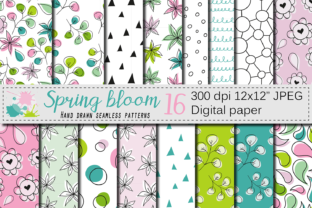
Seamless Digital Paper, Patterns is a curated collection of 16 hand-drawn, high-resolution digital backgrounds designed to integrate directly into creative and production workflows. Each file is a 12 x 12 inch JPEG at 300dpi — optimized for both screen-based design and professional printing. Unlike tiled or algorithmically generated repeats, these patterns are built from original botanical and decorative motifs: spring florals, delicate leaves, soft paisleys, and organic line work — all rendered in harmonious palettes of green and pink. Because every element is hand drawn, the textures retain warmth, variation, and subtle imperfection — qualities that translate well across physical and digital outputs without feeling sterile or over-processed.
Where Seamless Digital Paper, Patterns Fits in Your Creative Process
This set isn’t meant to sit unused in a downloads folder. It’s built for action — for insertion at specific points where visual cohesion, brand-aligned texture, or seasonal relevance matters. For example, a small business owner preparing a spring product launch might use one of the floral patterns as a background layer in a Canva social media banner *before* finalizing copy or scheduling posts. A freelance invitation designer may drop a leaf-based seamless paper into Adobe Illustrator as a base layer for a wedding suite — then build typography and illustrations on top, knowing the pattern will tile cleanly across envelopes, RSVP cards, and digital save-the-dates.
In educational or publishing contexts, educators creating printable classroom resources often need consistent, non-distracting backgrounds that support readability while reinforcing thematic units — like a botany lesson or seasonal writing prompt. A soft green-and-pink paisley pattern can serve as a subtle page border in a PDF handout, adding visual interest without competing with text. Similarly, bloggers designing branded Pinterest pins or email newsletter headers benefit from having a library of ready-to-use, on-brand textures that require zero time spent generating or licensing new assets.
Integration Across Tools and Platforms
The 300dpi JPEG format ensures compatibility across major design environments: Adobe Creative Cloud (Photoshop, Illustrator, InDesign), Affinity Suite, Canva, Figma (via image upload), and even desktop publishing tools like Microsoft Publisher or Apple Pages. No plugins, converters, or special software are needed. Because each file is watermark-free and delivered as a clean, standalone JPEG, there’s no risk of embedded restrictions interfering with export settings or print preparation.
For users working across devices — say, sketching initial layouts on an iPad with Procreate, then refining in desktop software — the uniform 12 x 12 size simplifies scaling. You can import the same file into multiple tools without recalculating canvas ratios or adjusting repeat offsets. That consistency reduces friction when moving between ideation, refinement, and delivery stages. It also supports version control: if you save layered project files, embedding a known, fixed-size background makes it easier to revisit and update designs months later without hunting down source assets.
Practical Implementation Tips
- Organize by use case, not just color. Create folders labeled “Scrapbooking,” “Product Packaging,” or “Digital Invitations” — then place copies of relevant patterns inside. This mirrors how you’ll actually reach for them during active projects, rather than scrolling through a flat list of 16 files.
- Test tiling before finalizing layouts. Even seamless patterns can reveal alignment quirks depending on software rendering or canvas dimensions. Open one file in your preferred tool, duplicate and offset it by half the width/height, and check for visible seams or contrast jumps — especially important for large-format prints or web banners spanning multiple viewports.
- Use layer blending modes intentionally. In Photoshop or Illustrator, try overlay, multiply, or soft light blending with these patterns beneath text or photos. The hand-drawn quality responds well to transparency adjustments, letting you mute intensity for subtlety or boost contrast for emphasis — all without altering the original file.
- Batch rename for clarity. Rename files with descriptive prefixes: “SPRING_Floral_Delicate_PinkGreen.jpg” instead of “Pattern_07.jpg.” This saves time when searching across cloud storage or local drives, particularly if you maintain multiple pattern libraries over time.
Supporting Quality Control and Long-Term Use
Because these are hand-drawn — not AI-generated or stock-sourced — they offer built-in uniqueness. That matters for creators building recognizable visual identities. If you’re developing a signature aesthetic for your Etsy shop, blog, or coaching program, using consistent, custom-feeling patterns helps reinforce brand memory. Over time, reusing the same spring palette across seasonal campaigns creates continuity — even as individual layouts evolve.
Quality control starts with preparation: verify file integrity immediately after unzipping (open each to confirm resolution and color fidelity), and store backups in at least two locations — local drive + cloud sync. Since JPEGs don’t support transparency, consider saving a flattened PNG version of any pattern you plan to overlay repeatedly — this avoids repeated JPEG recompression artifacts during iterative edits.
Long-term usability also depends on how you document usage. Keep a simple log — even a shared spreadsheet — noting which pattern was used where (e.g., “Paisley_GreenPink.jpg → Client X brochure, April 2024”). This helps track asset performance (which patterns get the most engagement or client approval) and informs future purchasing decisions — whether expanding into summer or autumn palettes, or seeking complementary elements like coordinating icons or borders.
Real-World Workflow Examples
A freelance stationery designer uses Seamless Digital Paper, Patterns to streamline client onboarding. When a new inquiry comes in, she shares a mood board built entirely from this set — pairing three floral patterns with sample fonts and layout sketches. Clients respond more quickly because the visuals communicate tone and seasonality instantly, reducing back-and-forth about “vibe.” Once approved, she drops the chosen pattern directly into her InDesign template, adjusts crop zones for different card sizes, and exports press-ready PDFs — cutting 2–3 hours off the average turnaround.
An indie skincare brand owner integrates the leaf-based patterns into packaging mockups before ordering physical samples. She applies one pattern as a background layer in a label template, then overlays product photography and ingredient callouts. Because the pattern is high-res and seamless, it scales accurately from 2 oz serum bottles to full-sized gift boxes — helping her visualize shelf impact early, avoid costly reprints, and present cohesive visuals to retailers.
A homeschooling parent building printable activity packs uses one of the softer floral patterns as a header background in Google Slides, then duplicates the slide for weekly vocabulary sheets. The consistent visual anchor helps children recognize the resource type across subjects — science, literacy, art — without needing new instructions each time. The hand-drawn quality also feels more inviting and less clinical than generic clipart, supporting sustained attention during independent learning tasks.
Seamless Digital Paper, Patterns works best when treated not as decoration, but as infrastructure — a reliable, reusable component that supports speed, consistency, and intentionality across diverse creative and operational needs. Its value compounds the more deliberately it’s embedded: in templates, shared libraries, client workflows, and personal systems. That’s how a set of 16 JPEGs becomes part of your working rhythm — not just something you own, but something you rely on.