50 Seamless Square Patterns for Designers & Creators
Whether you're designing a brand identity, building a presentation deck, preparing social media assets, or laying out a print brochure, background texture matters — not as decoration, but as quiet intention. The 50 Seamless Square Patterns collection delivers precisely that: intentional, versatile, and technically robust pattern foundations built for real-world use.
What You’re Actually Getting — Beyond the Numbers
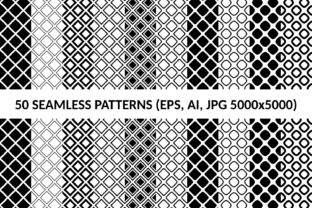
This package includes 100 total seamless patterns: 50 classic square layouts and 50 monochrome diagonal square variants — each thoughtfully split into 25 normal (sharp-cornered) and 25 rounded square designs. That distinction isn’t cosmetic. Sharp-cornered squares anchor layouts with structure and precision — ideal for corporate reports, UI wireframes, or technical documentation. Rounded squares soften tone without sacrificing clarity, making them especially effective in education materials, wellness branding, or inclusive digital interfaces.
All patterns are delivered in three formats: vector AI and EPS files (editable, infinitely scalable, layer-friendly), plus high-resolution JPGs at 5000×5000 pixels. That means you can drop a pattern into a 4K presentation slide, scale it across a 36" trade show banner, or tile it subtly behind body text in a PDF — all without pixelation or distortion.
Why Seamless Matters — And When It Saves Real Time
A “seamless” pattern repeats edge-to-edge without visible breaks or misalignments. That’s non-negotiable for backgrounds, fabric mockups, packaging wraps, or web page textures. Manually creating seamless geometry — especially with consistent spacing, balanced contrast, and clean vector paths — takes hours of trial, zooming, snapping, and exporting test tiles. With the 50 Seamless Square Patterns, that work is already done, tested, and optimized.
Consider a freelance graphic designer building a pitch deck for a sustainable apparel client. They need subtle, tactile texture behind product photos — something that reads as organic yet professional. Instead of spending 90 minutes tweaking a custom halftone grid, they apply one of the monochrome diagonal square patterns (say, Pattern #37 — a low-contrast, 8pt rounded square at 12% opacity). It tiles cleanly, scales to full bleed, and aligns visually with the client’s minimalist aesthetic. Time saved: ~75 minutes. Confidence gained: immediate visual cohesion.
Monochrome Diagonal Variants: Precision With Restraint
The 50 monochrome diagonal square patterns aren’t just grayscale versions — they’re re-engineered directional interpretations. Each uses strictly black, white, and neutral grays, with angles calibrated between 30° and 60° to avoid moiré in print and screen. That makes them uniquely suited for contexts where color must stay secondary: accessibility-focused websites (meeting WCAG contrast ratios when layered over light/dark backgrounds), legal or financial documents requiring neutrality, or B2B SaaS dashboards where data clarity outweighs visual flair.
Educators building printable worksheets benefit here too. A diagonal square pattern at 5% opacity adds just enough visual rhythm to guide the eye across a math worksheet — without competing with equations or distracting learners with color. Because these are vectors, instructors can recolor the entire pattern in seconds to match school branding or accessibility needs (e.g., switching from charcoal gray to navy for dyslexic-friendly contrast).
Who Uses These — And How It Fits Their Workflow
Small business owners often handle their own marketing: email headers, Canva social posts, Shopify banners. These patterns let them add polish without hiring a designer — just drag a JPG into Canva, adjust opacity, and go. No learning curves, no licensing ambiguity.
Bloggers and content creators use the vector AI files to build branded Notion templates or PowerPoint slide masters. Since each pattern is on its own layer, they can toggle visibility, change stroke weight, or isolate elements for animation — all within native Illustrator workflows.
Print publishers and packaging designers rely on the EPS format for compatibility with older RIP systems and large-format printers. The 5000×5000 JPGs serve as reliable fallbacks for quick client previews or CMS uploads where vector support is limited.
Realistic Fit Considerations
This collection excels where geometric consistency, scalability, and neutrality matter — but it’s not a universal substitute for illustrative, hand-drawn, or photorealistic textures. If your project calls for watercolor washes, grainy film overlays, or botanical motifs, this isn’t the right toolkit. Likewise, while the monochrome set supports accessibility well, it doesn’t replace thoughtful color-system design for neurodiverse audiences — it complements it.
Also note: “Seamless” refers to tiling behavior, not automatic responsiveness. You’ll still need to set repeat rules in CSS (background-repeat: repeat) or define tiling bounds in InDesign. But unlike many free pattern downloads, these files include precise bounding boxes and clean anchor points — so that setup takes seconds, not troubleshooting.
Practical Tips for Getting Started
- Start with opacity: Most patterns shine at 5–15% opacity over solid backgrounds. Try Pattern #12 (normal square, medium density) at 8% behind light gray text on white — it adds depth without compromising readability.
- Use rounding intentionally: Rounded squares feel more approachable. Reserve them for audience-facing materials (e.g., customer onboarding emails, workshop handouts) where warmth supports engagement.
- Leverage vector layers: In Illustrator, double-click a pattern group to edit individual squares — adjust corner radius, stroke weight, or spacing to fine-tune rhythm before exporting.
- Test in context: Drop a JPG into your actual layout file (not just a blank canvas) and view at 100% zoom. That’s the only way to confirm how spacing and scale interact with your typography and imagery.
Not Just Assets — A Consistency Anchor
Inconsistent visuals erode trust. A mismatched background in a single slide, an oddly scaled texture on a product label, or a jittery repeat in a mobile app UI quietly signals disorganization — even if viewers can’t name why. The 50 Seamless Square Patterns offer a controlled vocabulary: known proportions, predictable behavior, and cross-format reliability. That consistency becomes infrastructure — freeing mental bandwidth for strategy, storytelling, and problem-solving instead of pixel-perfect patching.
For educators building open educational resources (OER), that means reusable slide decks that hold up across institutions. For marketers running A/B tests on landing pages, it means isolating variable impact — because the background texture stays identical across variants. For developers embedding SVG patterns directly into CSS, it means lightweight, cacheable assets that render instantly, no external dependencies.
Ultimately, this collection isn’t about adding “more design.” It’s about removing friction — from production timelines, from decision fatigue, from compatibility concerns — so your focus stays where it belongs: on the message, the user, and the outcome.