Easter Seamless Patterns: A Practical Guide for Designers and Crafters
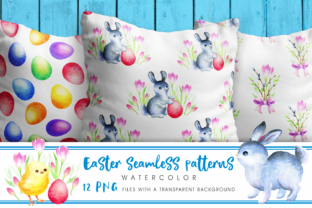
Easter Seamless Patterns refer to a curated set of 12 high-resolution, hand-painted watercolor illustrations designed specifically for repeatable digital use. Each file is delivered as a PNG with full transparency, sized at 5000 × 5000 pixels and rendered at 300 dpi — making them suitable for both print and digital applications where clarity and scalability matter. The collection is packaged in a single ZIP archive (127 MB), offering immediate access without subscription or licensing tiers.
What Sets These Patterns Apart
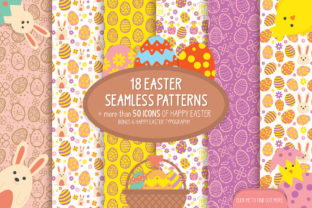
Unlike algorithmically generated repeats or vector-based tile sets, this Easter Seamless Patterns collection emphasizes organic texture and painterly authenticity. Each motif — think delicate eggs, sprigs of lavender, soft bunny silhouettes, and subtle floral vines — was created using traditional watercolor techniques before being digitally refined for seamless tiling. The result is a tactile quality that’s difficult to replicate with flat digital brushes or AI-generated assets.
The transparent background is non-negotiable for versatility: it allows designers to overlay patterns onto colored substrates, blend with gradients, or integrate into layered mockups without clipping masks or manual cleanup. At 5000 × 5000 px, the resolution supports large-format printing — such as fabric yardage, greeting card stock, or wall decals — while remaining responsive enough for web banners or social media templates when scaled down.
How It Compares With Other Pattern Types
Seamless patterns come in several common formats — vector tiles, raster repeats, procedural textures, and hand-drawn scans. Each has tradeoffs in fidelity, flexibility, and workflow compatibility.
- Vector-based seamless patterns scale infinitely and edit cleanly in Illustrator, but often lack the nuanced grain, pigment bleed, and irregular edges found in real watercolor. They’re ideal for logos or branding systems needing precision, but less suited for artisanal or nostalgic Easter themes.
- Procedural or AI-generated patterns offer speed and variation, yet tend toward repetition fatigue or stylistic inconsistency. Fine details like watercolor blooms or salt texture are rarely simulated convincingly — and transparency handling can be unpredictable across platforms.
- Scanned hand-drawn repeats capture authenticity but often require significant cleanup: removing paper texture, correcting alignment seams, or adjusting contrast. This Easter Seamless Patterns set skips those steps — the tiling is pre-verified, the edges match precisely, and no post-processing is needed to achieve a clean repeat.
This distinction matters most when time, aesthetic control, and output fidelity intersect — for example, a small-batch stationery designer preparing Easter cards for a spring launch, or a boutique printer sourcing ready-to-use textile motifs for limited-run fabric panels.
Practical Use Cases and Realistic Fit
Easter Seamless Patterns work best when the project calls for warmth, craft-oriented appeal, and moderate production volume. Consider them for:
- Print-on-demand products like mugs, tote bags, or notebooks where watercolor softness reads well at mid-range sizes;
- Digital invitations and email headers that benefit from gentle, non-distracting backgrounds;
- Branded packaging for seasonal confectionery or botanical skincare lines aiming for a natural, handmade impression;
- SVG overlays in Canva or Figma prototypes where transparent PNGs drop in without layer conflicts.
They’re less optimal for ultra-minimalist branding systems requiring sharp geometry or monochrome consistency. Similarly, if your workflow relies heavily on parametric adjustments — say, dynamically shifting hue, saturation, or scale across dozens of variants — raster files limit real-time iteration compared to vector or CSS-based patterns.
File Specifications in Context
The 5000 × 5000 px dimension isn’t arbitrary. It balances detail retention with manageable file size per asset. At 300 dpi, that resolution comfortably covers an 16.67" × 16.67" print area — enough for a full-page layout or half-yard fabric repeat. Smaller outputs (e.g., Instagram posts or business cards) will retain crispness even when scaled to 25%.
The 127 MB ZIP reflects uncompressed, high-fidelity source files — not compressed JPEGs or low-res previews. That size signals readiness for professional use, but also means slower download times on unstable connections and higher local storage demand. Users working offline or on devices with limited space may prefer lighter alternatives — though those usually sacrifice either resolution, transparency, or hand-crafted nuance.
When to Choose — and When to Look Elsewhere
Easter Seamless Patterns suit users who prioritize visual character over infinite scalability or automation. If you’re evaluating options, ask yourself:
- Is authenticity central to the project’s tone? For Easter-themed campaigns evoking childhood memories, garden freshness, or slow-craft values, hand-painted texture adds resonance that generic repeats lack.
- Do you need plug-and-play usability? These files import directly into Photoshop, Affinity Photo, Procreate, and most desktop publishing tools without conversion or seam correction.
- Is your output mix balanced between print and screen? The resolution and transparency support both — unlike many free pattern libraries that optimize only for web (72 dpi, RGB-only) or only for textiles (repeat swatches without alpha channels).
Conversely, consider alternatives if:
- You require editable color palettes across all 12 patterns — vector or layered PSD files would allow global hue shifts; these PNGs do not;
- Your timeline demands rapid A/B testing of dozens of layout variations — in which case, lighter-weight SVG patterns or CSS grid repeats may accelerate iteration;
- You’re building a design system for enterprise use, where consistent licensing, metadata, and cross-platform rendering guarantees are mandatory — subscription-based pattern services sometimes provide those assurances more transparently.
Integration and Workflow Notes
No special software is required to use Easter Seamless Patterns, but some practical considerations help avoid frustration. In Photoshop, use “Edit > Define Pattern” after opening a single file — the transparency carries through, so overlays behave predictably. In Illustrator, place the PNG into a pattern swatch via “Object > Pattern > Make,” then adjust spacing manually if needed (though the built-in tile alignment usually requires no adjustment).
For web use, convert individual patterns to WebP for smaller load times without visible quality loss — especially important for email clients or landing pages where bandwidth is constrained. Avoid JPEG: it flattens transparency and introduces compression artifacts near soft watercolor edges.
A Final Note on Evaluation
Choosing the right Easter-themed pattern resource isn’t about finding the “best” option overall — it’s about matching technical attributes, aesthetic intent, and operational constraints. Easter Seamless Patterns stand out in their niche: high-fidelity, hand-painted, print-ready, and immediately deployable. They reflect a specific design ethos — one that values material honesty over digital convenience, and quiet charm over visual noise.
If that aligns with your current project’s goals, timeline, and audience expectations, they’re worth the download and integration effort. If not, that’s equally valid — and knowing why helps refine future selections, whether for Easter or beyond.